Vooks: Read-Aloud Kids' Books
- 4.3
- Rating
- 500.00K
- Installs
- Free
- Price

 Analysis by App-foxy
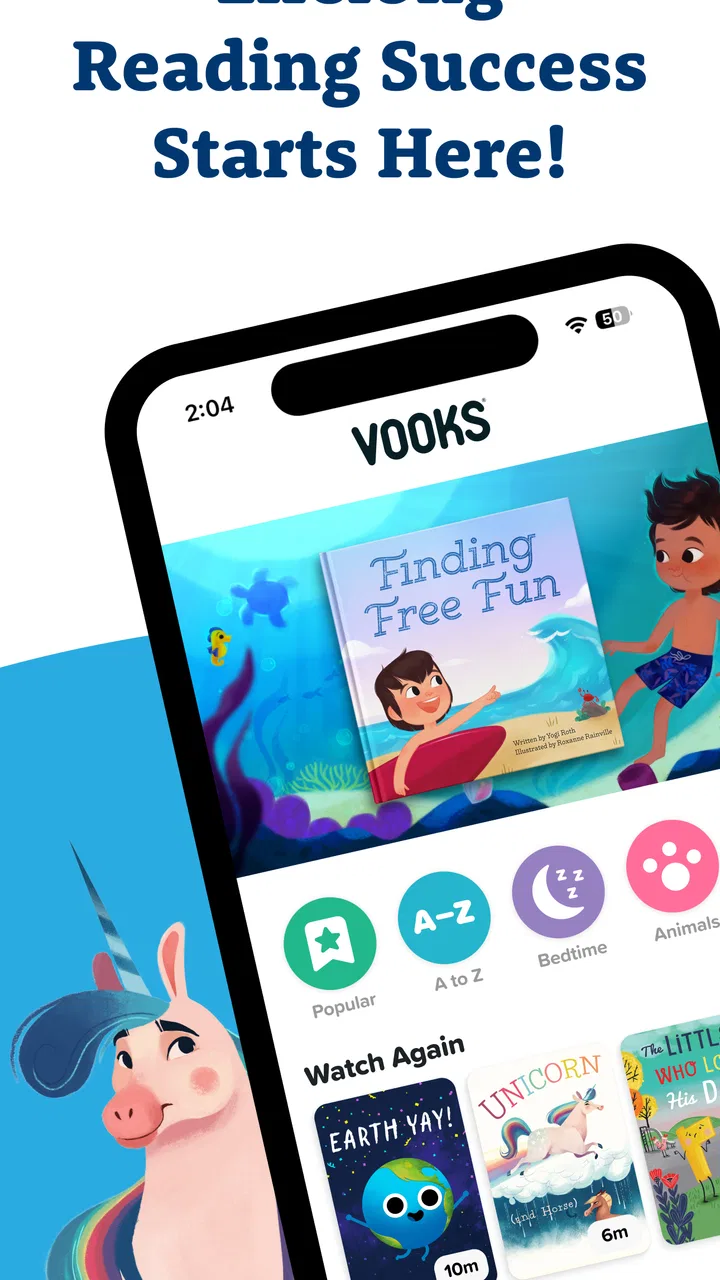
I came away from Vooks: Read-Aloud Kids' Books seeing it as a carefully focused education app rather than a general video service with a few stories added. Its purpose is simple: give children animated books that can be watched and heard, making a short screen session feel closer to shared storytime. I found that focus useful, especially when I wanted something calmer and more purposeful than open-ended cartoons.
The app is free to install, is suitable for Everyone, and comes from Vooks Inc. It has reached over 500 thousand installs and holds a 4.3 average from around 4 thousand ratings, which suggests that many families find the basic idea worthwhile. The important question, though, is not whether animated books sound appealing. It is whether the experience fits your child, your reading routine, and the way you handle paid content inside a children’s app.
Where families usually get stuck
The first point of friction is expectation. A parent may open the app hoping for a conventional digital library where a child browses pages, taps words, and reads independently. Vooks is better understood as a guided viewing experience. The stories are animated and read aloud, so the child can follow the narrative without already being a confident reader. That makes it approachable for younger children, but it also means it is not a full replacement for paper books or interactive reading practice.
You May Also Like

 Blood Strike: 2.5 Anniversary
Blood Strike’s Loadouts Turn Every Drop Into a Tactical Gamble
A close look at Blood Strike’s custom loadouts: how fast access to signature weapons reshapes its battle royale rhythm, rewards preparation, and narrows the gap between fights.

 Pandora - Music & Podcasts
Pandora’s Music Is Easy to Start, but Harder to Recover
Pandora’s strength is its low-effort path from a seed to a station. Its weak spot is how much confidence it asks you to place in connection, setup, and quiet recovery.

 8 Ball Pool
 Is Built on Rivalries, Rematches, and Routine
A close look at the rivalries, rematches, shared routines, and unanswered safety questions that turn a quick pool match into a persistent mobile community.

 Samsung Music
’s Quiet Strength Is Playing What You Already Own
Its reach comes less from spectacle than from dependable access to a personal library. That simplicity is both the app’s strongest retention engine and its ceiling.

 AccuWeather: Weather Radar
AccuWeather Review: A Quick, Clear Forecast for Everyday Decisions
For everyday plans, the best forecast is the one you can understand quickly. AccuWeather makes rain timing, radar, and local conditions easy to act on, with a few trade-offs.

 Hill Climb Racing
Why Hill Climb Racing Still Turns Crashes Into One More Run
A tiny car, a bumpy hill and one more upgrade: Hill Climb Racing keeps resurfacing because its simple chaos makes every near-miss feel personal.
More From Our News Desk



I would introduce it to a child as “storytime on the screen,” not as a game. That small explanation matters. Children who expect buttons, rewards, or constant interaction may initially find the format quiet. Children who enjoy listening and watching a story unfold are more likely to settle into it. In my view, the app works best when an adult treats the screen as a shared starting point rather than handing it over as an unlimited distraction.
Another common sticking point is the difference between the free entry point and the broader experience available through in-app purchases. The app itself costs nothing to download, while individual purchases range from $9.99 to $69.99. I would check the available access before promising a child a particular story. That prevents the awkward moment when a child chooses something that requires a purchase and the adult has to interrupt the routine.
The app’s age rating is Everyone, but that does not mean every story will suit every child equally. A preschooler, an early independent reader, and a child who needs more advanced material can all be “everyone” in store terms while wanting very different pacing and subject matter. I recommend watching the beginning of a title with your child and noticing whether the narration, vocabulary, and animation feel comfortable rather than relying on the age label alone.
Parents can also get stuck by judging the app against a printed book too quickly. A physical book invites conversation, page turning, and a child’s own pace. Vooks adds movement, sound, and narration, which can help a reluctant listener stay engaged, but those elements can also draw attention away from the words. The strongest use is not replacing every book at home; it is adding a dependable story option when an adult cannot read aloud at that exact moment.
What the first session is really good for
My preferred first session would be short and supervised. I would let the child choose from the available stories, watch enough to see whether the narration holds attention, and then ask one simple question about what happened. This reveals more than a quick glance at the store page. You learn whether the child follows the plot, whether the animation is distracting, and whether the story encourages conversation afterward.
A realistic example is the late-afternoon transition between school and dinner. A child may be tired but not ready to sit with a worksheet, while a parent needs a few quiet minutes to finish preparing food. One selected story can provide a calmer bridge than a random stream of videos. I would still set the stopping point in advance, because the app’s educational purpose does not automatically prevent a child from wanting one more story.
Setup checks that prevent avoidable frustration
Before using it as part of a routine, I would install it on the device the child actually uses and check that the operating system is compatible. The Android minimum is version 7.0, and the current app version is 19.7.0. That is useful information if you are reviving an older tablet: an installation problem may be caused by the device rather than by the app itself.
I would also open the app while connected to a stable network and give the initial screens time to finish loading. Animated books combine visuals and spoken audio, so a slow or unstable connection can make the first experience feel broken even when the application is working normally. If a story pauses, I would first wait briefly, try another title, and test the same connection with a different ordinary online service before assuming the whole catalog is unavailable.
Sound deserves its own check. On a shared family tablet, volume may be low, muted, routed to headphones, or limited by a previous user’s settings. I would play a story with the device held at a comfortable listening distance and confirm that narration is clear before giving it to a child. If the animation appears but the voice cannot be heard, checking the device’s media volume and audio output is more sensible than immediately reinstalling the app.
Screen orientation and brightness can also affect the experience, particularly for younger children who hold a tablet in different positions. I would place the device on a stable surface, adjust brightness for the room, and avoid testing in direct glare. These are small details, but they reduce the temptation to treat ordinary viewing discomfort as an app defect.
The account and purchase stage is where I would slow down. Since the app includes in-app purchases, an adult should review the purchase prompts personally and decide whether the free access is enough. I would not let a child explore payment screens alone. If the app is being used on a family device, it is also wise to make the purchasing decision before storytime, so the child is not waiting while an adult reads every option under pressure.
One practical setup habit is to create a repeatable selection routine. For example, choose a story before handing over the tablet, sit nearby for the opening, and agree on what happens when it ends. This avoids turning the home screen into a long browsing session. It also makes it easier to tell whether the app is helping with reading time or simply becoming another source of negotiation.
How I would prepare it for different children
For a child who is not yet reading independently, I would focus on listening and retelling. Pause after the story and ask the child to describe a character’s problem or predict what might happen next. The app supplies the narration, but the adult supplies the interaction that turns passive viewing into language practice.
For an emerging reader, I would use the animated story as a preview before reading a related paper book together. Seeing the plot first can make unfamiliar vocabulary less intimidating. The trade-off is that the child may rely on the voice instead of attempting the words, so I would sometimes mute the device and read the same section aloud from a physical book rather than using Vooks for every reading exercise.
For siblings, I would choose a story together and ask each child to notice something different. One might watch for changes in the main character, while the other listens for repeated words. This gives the shared screen a purpose and reduces arguments over random selection. It also exposes a limitation: the app is not a personalized tutoring system, so an adult still needs to adapt the activity to each child.
Recovering when the workflow breaks
When a story does not start, I would use a simple sequence instead of repeatedly tapping the same control. First, I would check the connection and try a different title. If only one story has trouble, the issue may be limited to that selection or its loading state. If nothing responds, I would close and reopen the app, then restart the device if necessary. These basic steps are not glamorous, but they are the safest first response to ordinary loading problems.
If the app opens but the child cannot hear narration, I would check media volume, mute status, Bluetooth or wired audio, and whether another application has taken control of sound. I would then test a second story. This separates an audio-output problem from a title-specific problem without making unsupported assumptions about the app’s internal systems.
If the screen freezes during a story, I would avoid rapidly pressing multiple buttons, because that can make it harder to tell whether the app is responding. I would wait a moment, exit if possible, and reopen it. If the same behavior returns, checking available device storage and updating the operating system where appropriate can be useful general maintenance. I would also note whether the problem happens on every title or only one, since that detail is valuable when contacting support.
Reinstallation should be a later step, not the first one. It can remove temporary application problems, but it may also erase local state or force a fresh sign-in, depending on how the device handles the app. Before reinstalling, I would make sure I know which account was used and that any purchase access can be restored through the normal platform account. I would never tell a parent to repeat a purchase simply because the app is not showing access immediately.
Payment confusion needs a similarly cautious approach. If a purchase prompt appears unexpectedly, stop and read it rather than tapping through to make the screen disappear. If a completed purchase is not visible, verify the platform account and restart the app before trying again. Keep the receipt or transaction information available when seeking help. The key point is to avoid duplicate charges while troubleshooting an access problem.
There is also a workflow issue that technical fixes cannot solve: a child may keep leaving the story to browse. In that case, I would select the title myself, begin it with the child, and keep the tablet positioned for viewing rather than handing it over for unrestricted exploration. This is not a hidden setting I am claiming the app provides; it is a practical way to make the existing story format work better in a busy household.
When the app is not the cause
Sometimes the real problem is the device. An older tablet may have limited performance, a nearly full storage area, a worn battery, or inconsistent Wi-Fi. If other media apps also stutter, the sensible conclusion is that Vooks is only exposing a broader device issue. Testing the tablet with another ordinary video or audio activity can help separate those causes.
Sometimes the problem is the environment. A noisy kitchen makes narration difficult to follow, while a dark room can make a bright animated screen feel uncomfortable. A child who is hungry, overtired, or overstimulated may reject even a well-made story. I would change the setting before deciding that the catalog is unsuitable: lower the volume only if the voice remains clear, move to a quieter room, and use a shorter session.
It is also possible that the child needs a different kind of reading support. Vooks is a strong fit for listening, visual context, and shared discussion, but it is not the best choice if your main goal is handwriting, phonics drills, detailed comprehension testing, or independent page-by-page reading. A library book, a structured literacy tool, or an adult-led activity may be better for those needs. I would use Vooks as one part of a reading mix, not as a complete curriculum.
Families who want extensive customization may find the experience too guided. The appeal is that the child can enter a story without managing complicated controls. The cost of that simplicity is less control over pacing and learning targets than you might get from a dedicated reading program. Likewise, children who mainly want fast games may not stay interested, while children who enjoy narrated stories may appreciate the lower-pressure format.
The subscription or purchase decision deserves a realistic test. Start with the free experience, observe whether your child returns voluntarily, and ask whether the stories are actually being discussed or remembered. If the app only serves as background noise, paying for broader access is difficult to justify. If it becomes a reliable part of bedtime, quiet time, or a travel routine, the value may be easier to see. I would make that decision based on repeated household use, not on the size of the catalog alone.
My practical verdict after using it as a family reading tool
Vooks Inc has built an education app with a clear identity: animated read-aloud books for children who benefit from hearing a story while watching it unfold. I like that it can make a short screen session feel more intentional than aimless browsing, and I found the format especially useful for reluctant listeners, pre-readers, and families trying to create a predictable story routine.
Its limitations are just as clear. It does not replace the physical interaction of a book, it may not satisfy children looking for game-like activity, and the presence of in-app purchases means an adult should handle access decisions carefully. Loading, sound, and device performance can also create misleading first impressions, so I would run the basic setup checks before judging the content.
The app was released on October 16, 2018, and its continued presence alongside the current version shows that it is an established option rather than a brand-new experiment. Still, longevity alone is not a reason to install it. I would choose it for a child who enjoys being read to, a parent who wants a guided screen alternative, or a household that needs a flexible storytime backup.
I would skip it if your priority is intensive literacy instruction, fully independent reading, or unrestricted access to a large traditional library. In those situations, a physical library, an ebook reader, or a specialized learning app may serve you better. For everyone else, I recommend trying one story with an adult nearby, checking the audio and connection first, and watching what the child does afterward. If the child talks about the characters, asks for another story, or begins connecting the animation with real books, then Vooks is doing something genuinely useful: turning a convenient screen moment into a conversation about reading.
FAQs for Vooks: Read-Aloud Kids' Books
01What is Vooks: Read-Aloud Kids' Books?
Vooks is a children’s reading and storytelling app that combines animated storybooks with professional narration, music, and gentle sound effects. Instead of presenting only static pages, it brings selected picture books to life while keeping the reading experience calm and easy to follow. It is designed mainly for young children and families who want screen time to feel more educational and story-focused.
02Is Vooks suitable for my child’s age?
Vooks is generally aimed at preschool and early elementary-aged children, although the best choice depends on your child’s reading ability, interests, and attention span. Younger children can listen to narrated stories and watch the animations, while older children may use the app to support independent reading. Parents should review the available library because story difficulty and themes can vary.
03Does Vooks require an internet connection?
An internet connection is normally needed to browse the catalog, sign in, and stream books. Depending on the current subscription and app features, selected stories may also be available for offline viewing after they are downloaded. Offline access is useful for travel or areas with unreliable connectivity, but parents should download content in advance and check that it plays correctly before going offline.
04Is Vooks free to use, and does it include in-app purchases?
Vooks typically offers access through a subscription model, and availability of free trials, plans, pricing, and promotional offers can change by platform or region. Some features or books may be restricted unless you subscribe. Before confirming a trial or purchase, carefully check the billing terms in the Google Play Store or Apple App Store, including automatic renewal and cancellation requirements.
05Is Vooks safe and useful for children?
Vooks is built around curated children’s books and a relatively calm, learning-oriented viewing experience rather than fast-paced entertainment. It can encourage listening, vocabulary development, story comprehension, and family reading time. However, it should not replace conversation, hands-on play, or traditional reading with an adult. Parents should still use device controls, supervise younger children, and review privacy and account settings.
Pros
- Engaging read-aloud narration helps children follow stories independently.
- Colorful illustrations and animations keep young readers interested.
- Supports early literacy
- vocabulary
- and listening comprehension skills.
- Offers a curated library designed specifically for children.
- Useful for quiet time
- bedtime
- or screen-based reading routines.
Cons
- Most of the library requires a paid subscription after the trial.
- Content may feel too simple for older or advanced readers.
- Requires internet access for much of the available content.
- Screen time can still be a concern despite its educational focus.
- Limited customization options for narration speed and reading preferences.

Vooks: Read-Aloud Kids' Books
Gallery